

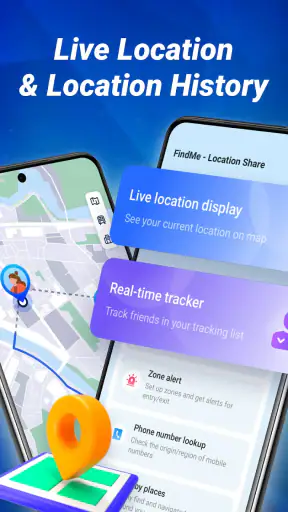
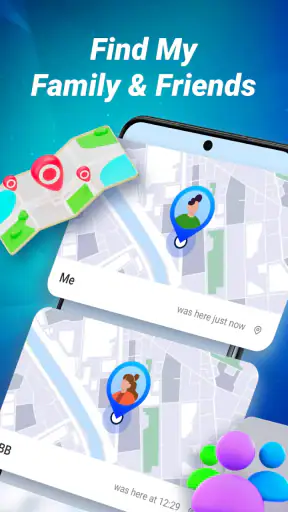
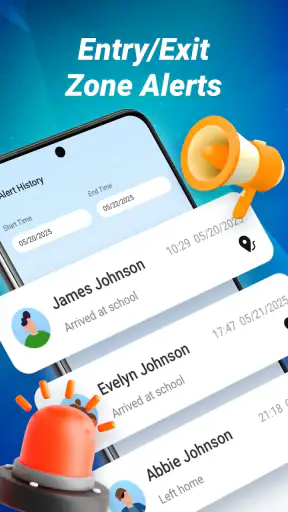
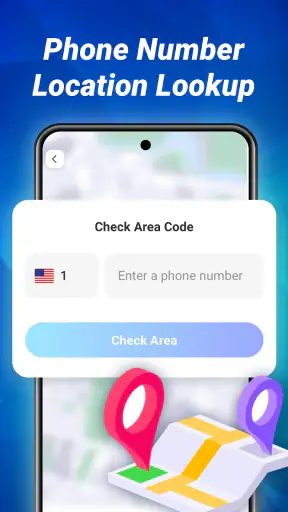
Sharing a location sounds simple until someone is waiting outside a station, a family member is trying to find you in a crowded area, or a group needs to coordinate without sending a string of confusing map pins. FindMe - Location Share is built for that everyday problem. It is a free maps and navigation app from Bersamakitta that focuses on staying connected through a GPS map rather than turning navigation into a large, complicated system.
I found its appeal easiest to understand when treating it as a small circle tool: people who already know one another can use it to make meeting up less stressful and to check where a shared contact is. That focus is useful, but it also means the app is not automatically a replacement for a full navigation service, a dedicated emergency solution, or a family-management platform. Its value depends heavily on everyone setting it up correctly and keeping the phone ready to share location.
Where the experience usually gets stuck
The first obstacle is not usually the map itself. It is the chain of small conditions behind a live location: the right person must be included, the phone must be able to determine its position, the app must be allowed to work as expected, and the device must have a usable connection. If one link fails, a reader may assume the map is broken when the real problem is setup or the phone environment.
That is why I would not judge FindMe after opening it once and seeing an empty or incomplete view. A location-sharing app needs another person and a real situation to prove its usefulness. Before relying on it for a meeting, I would test it with a trusted contact while both of us are at home. That quick rehearsal exposes misunderstandings without adding pressure when somebody is already late.
Another common point of friction is confusing “sharing my location” with “finding another person.” Those are related but not identical actions. The other person has to be part of the intended circle or sharing flow, and they also need to understand what they are expected to do. Sending an app invitation without explaining the purpose can lead to a stalled setup, especially when the recipient assumes that installing it alone will make their position visible.
I also recommend agreeing on a simple rule before using the app: share only with people you trust, and stop sharing when the situation is over if continuous visibility is no longer needed. That is not a criticism of this particular product; it is good practice for any location sharing app. Convenience is valuable, but location is personal information, so the social agreement matters as much as the map.
What I check before the first real trip
My first check is whether both phones can determine their position outdoors. I would step near a window or outside, open the app, and wait briefly rather than testing in a basement, underground platform, or dense building. GPS can be affected by surroundings, and a weak first reading can look like an app failure even when the phone simply has difficulty seeing the sky.
Next, I check the phone’s general location setting and the application’s access to it. The exact wording differs between Android and iOS, but the principle is the same: if location access is blocked, the map cannot show a useful current position. I would also check whether the operating system has restricted background activity or battery use for the app. A phone that aggressively pauses apps may stop updating a position as reliably as the user expects.
The device requirement is fairly approachable. FindMe supports Android devices running version 7.0 or later, which covers a broad range of phones, including older hardware. Still, compatibility does not guarantee a smooth experience on every model. Older devices may have slower GPS responses, tighter battery controls, or weaker performance when several apps are open. I would close unnecessary apps and keep the phone charged before using location sharing for a long outing.
Finally, I confirm that the person I want to reach is using the same workflow and has a connection. A map can display a last-known position or remain unchanged when the other phone is offline, has lost mobile data, or has been placed in a mode that limits updates. I would avoid promising a friend that the map will behave like a continuously refreshed radar. It is better to describe it as a practical way to share and check location, with results depending on the phones and network involved.
A calmer setup for families and small groups
For a household, I would set up one person at a time instead of asking everyone to install and configure the app during a busy morning. Start with two trusted users, confirm that each can see the intended location, and only then add another member. This makes it much easier to identify whether a problem belongs to one phone or to the overall sharing arrangement.
For a group meeting, I would choose one coordinator and use the app alongside a plain-language meeting instruction. For example, everyone can share their location while travelling, but the coordinator can still post a landmark or entrance name in the group chat. A GPS dot can place someone near a large building without explaining which door they should use. Combining the map with a visible landmark is more reliable than expecting the map to solve every last step.
There is also a useful privacy habit here: do not create a permanent sharing routine for a one-off event. If the purpose is a concert, school pickup, hike, or airport meeting, decide when the location is needed and when it is no longer necessary. This keeps the workflow understandable and reduces the chance that someone forgets they are still visible to a circle after the original plan has ended.
Recovering a location-sharing workflow
When a position does not appear, I troubleshoot in a fixed order instead of repeatedly tapping the map. First, I ask whether the problem affects one person or everyone. If only one contact is missing, I check that person’s phone, location setting, connection, and sharing state. If nobody can see anything, I restart the basic test with two trusted devices in a place where GPS should work.
The next step is to move outdoors for a short test. This separates a signal problem from an account or sharing problem. If the position appears outside but not inside a large building, the app may be fine and the environment may be the limiting factor. In that case, I would use the app before entering the building and give the other person a meeting point that does not depend on precise indoor positioning.
If the map seems frozen, I check whether the phone has gone into a low-power state, whether connectivity has dropped, and whether the application is being prevented from operating in the background. I also look at the obvious basics: the device is not in airplane mode, mobile data or Wi-Fi is available where needed, and the app is running the current installed release. FindMe’s current version is 1.0.44, so keeping the installation current is a sensible maintenance step without treating an update as a guaranteed cure for every issue.
After that, I close and reopen the app, then repeat the test rather than jumping straight to reinstalling. Reinstallation can remove local setup context or force everyone to repeat the sharing process, so I reserve it for cases where simpler checks have failed. I would also avoid changing several phone settings at once. One change at a time makes it clear which adjustment helped.
How I would recover before an important meeting
Imagine I am meeting a friend at a busy shopping area. The friend says my position has not moved for several minutes. I would not keep walking while assuming the map is live. I would send a short text saying where I am, check that my phone still has a connection, open the app again outdoors, and agree on a fixed entrance or shop. The app can then support the meeting instead of becoming the only source of truth.
If the friend still cannot see me, I would ask them to perform the same checks on their phone. This matters because the viewer’s connection or app state can also affect what they see. If the situation is urgent, I would use a normal call or message as the fallback. FindMe is a coordination aid, not something I would treat as a substitute for direct communication when timing or safety is critical.
For a regular commute, a short pre-departure test is more useful than troubleshooting at the destination. Open the app while still connected, confirm that the relevant contact appears, and then leave. If the phone is already struggling to locate itself at the start, waiting until the user is in a crowded transit area makes recovery harder. This small habit is one of the most practical ways to avoid blaming the app for a preventable setup problem.
When the app is not the cause
GPS is not a perfect indoor positioning system. Tall buildings, underground areas, heavy construction, and enclosed transport can all make a location less precise or slower to update. A dot that appears several metres away, or that takes time to settle, is not automatically evidence of a fault in FindMe. I would interpret the map as an aid to orientation, not as a survey-grade measurement.
Network conditions create another boundary. A phone may know where it is but be unable to communicate that information promptly. The reverse can also happen: the map may retain an earlier position while the person has already moved. For that reason, I would pay attention to whether the displayed position is current enough for the task. Meeting a friend at a café is forgiving; coordinating a moving group in a place with poor coverage requires a backup plan.
Battery management can be just as important. A phone that is nearly empty may reduce background activity or shut down services to preserve power. I would charge before a long day, avoid assuming that a low-battery device will share continuously, and tell the group if I am about to lose power. This is especially important for children, hikers, or anyone travelling alone, where a silent phone can create unnecessary worry.
There is also a human limitation: people may forget to join the intended circle, decline access, close the app, or misunderstand who can see them. No map interface can correct a sharing arrangement that was never completed. I prefer a clear verbal check—“Can you see my location now?”—over assuming that installation equals participation.
Who gets the most from FindMe
I see the strongest fit for trusted friends, couples, families, and small groups that need simple coordination. It can be handy when several people are travelling to the same place, when a parent wants a straightforward way to coordinate a pickup, or when friends are trying to find one another at an event. The free price also makes it easy to test without turning a short-term need into a subscription decision.
The Everyone content rating makes the app approachable for a broad audience, but that should not be confused with “appropriate for every situation without supervision.” Younger users still need guidance about privacy, who is included, and when sharing should stop. I would introduce it as a tool for a known circle, not as an invitation to make a location public.
The app has gained a sizeable audience, with more than a million installs and an average score of 4.2 from roughly four thousand ratings. Those figures suggest that the basic idea is resonating with many users, but they do not remove the need to test it on the specific phones and networks your group uses. Location tools are unusually dependent on device settings, so personal testing remains more informative than a headline score.
Who should choose a different tool
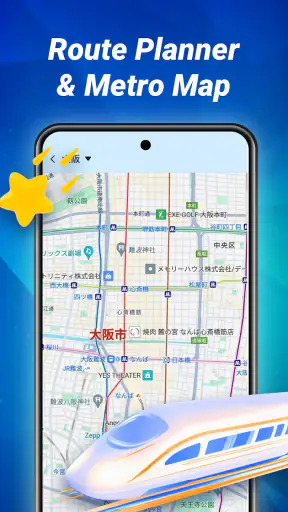
I would look elsewhere if my main need were turn-by-turn driving directions, public transit planning, detailed hiking maps, or a comprehensive place-search database. FindMe belongs to the location-sharing side of maps and navigation. A conventional navigation app is usually better when the question is “How do I get there?” rather than “Where is my trusted contact?”
I would also be cautious about using it as the only safety measure for remote travel or emergencies. A location-sharing map can be helpful, but it depends on a working phone, positioning, connection, battery, and a person checking the information. For serious travel, I would still tell someone the route, carry suitable supplies, and use a purpose-built emergency process where appropriate.
Compared with sending a one-time map pin through a messaging app, FindMe is more suitable when a small group needs an ongoing shared view rather than a single snapshot. The trade-off is extra setup and a stronger need to understand who is included. Compared with a large family-safety platform, it may feel less overwhelming for users who only want location coordination, while people seeking extensive household controls may prefer a more specialized service.
My practical verdict
After looking at the way this app fits into real routines, I think FindMe - Location Share is most convincing when used deliberately: set up a trusted circle, test it outdoors, keep the phones connected and charged, and pair the map with a clear meeting point. Its strength is not trying to be every kind of navigation tool. It gives location sharing a focused place in the day-to-day coordination between people who already know one another.
The developer, Bersamakitta, presents a straightforward concept, and the free model lowers the barrier to trying it. Android users can install it on devices from version 7.0 onward, while the current release is 1.0.44. I would still allow a few minutes for setup and a test with the actual contacts before depending on it during travel. That preparation is not wasted time; it is what turns a location map from a hopeful shortcut into a dependable part of a plan.
My recommendation is positive for families, friends, and small groups who want a dedicated way to share where they are without needing a full navigation suite. I would skip it as a sole solution for emergencies, highly precise indoor tracking, or detailed route planning. The best results come when FindMe supports communication rather than replacing it. Used that way, it is a practical free app with a clear purpose, sensible everyday uses, and limitations that are manageable once users understand where GPS, connectivity, battery, and human setup enter the picture.


